Reminders
Use reminders to build a capture habit without forcing a schedule.
Managing Your Capture Reminders
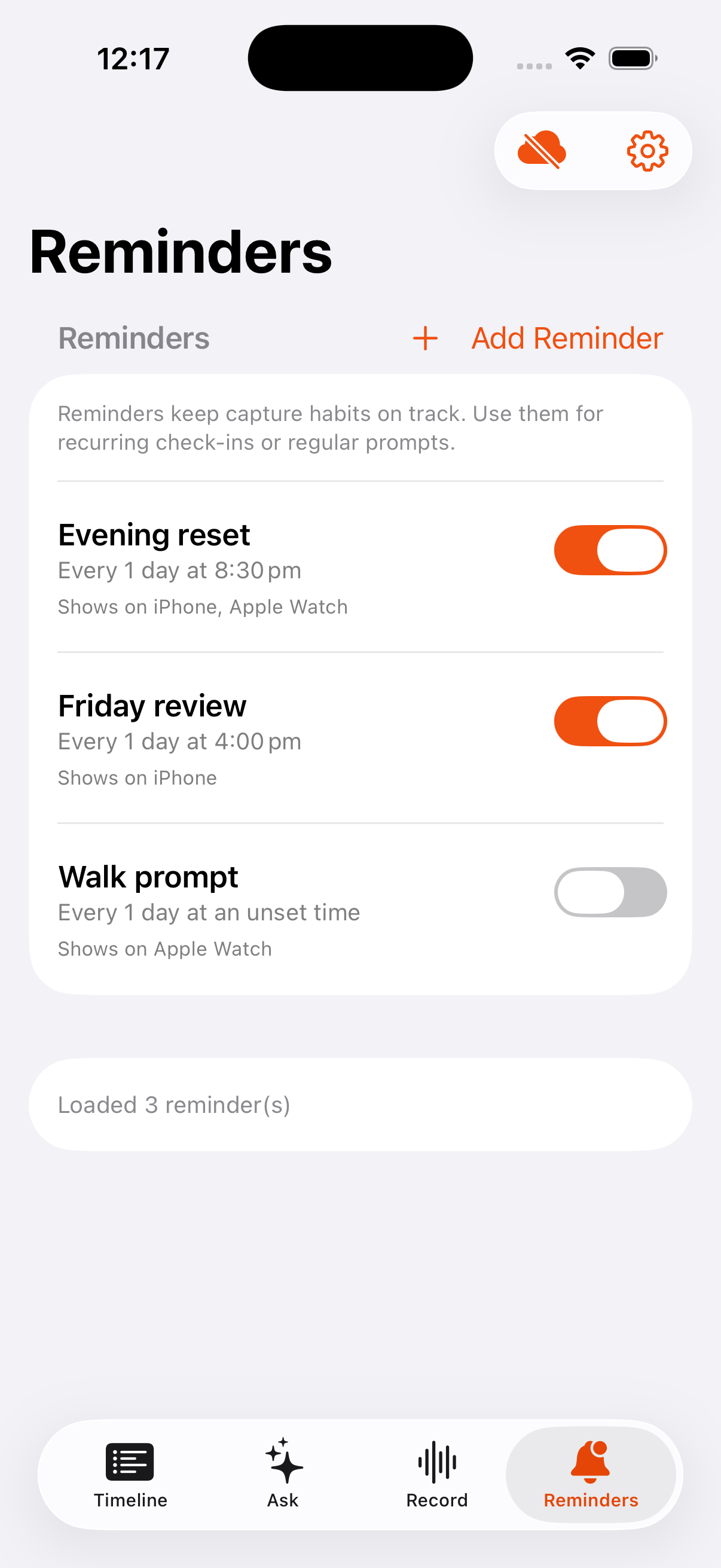
Capture reminders help you build a habit of voice journaling. Sundown can prompt you on iPhone, Apple Watch, or both.
How they work
- Reminders sync through your Sundown account when cloud sync is on.
- Each device delivers its own local notifications.
- You can choose whether a reminder appears on iPhone, Apple Watch, or both.
Creating a reminder
- Go to the
Reminderstab. - Tap
Create Reminder. - Choose a frequency:
Intervalfor every X minutes or hours.Dailyfor a specific time every day.One-offfor a single prompt in the future.
- For interval reminders, set a start and end time so prompts arrive during the part of the day you want.
Responding to a prompt
When a reminder appears on Apple Watch:
Record nowstarts a recording immediately.Snoozepostpones the reminder by 10 minutes.Skipdismisses the reminder for this cycle.
Notes
- Reminders support the capture habit; manual capture is always available.
- You do not need to categorize anything before recording.
- Sync can happen after the note is saved.
- Pull to refresh in the
Reminderstab to push local changes and pull the latest reminder and journal updates from Sundown Cloud.